60 Coordinate Systems are supported in Quickmap for input, export and display such as NZTM and Local Circuits.
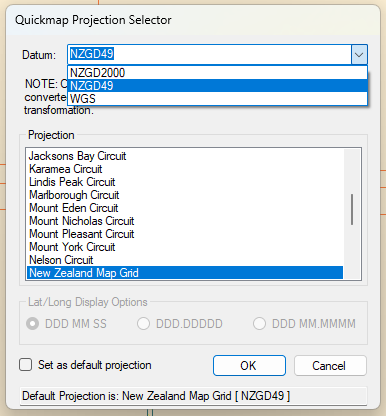
Select the required co-ordinate system through Tools-> Options-> Co-Ordinate Display.
Select the Datum from the drop-down arrow and then choose the Projection required.
If you require this projection to be the default, place a tick in the box and click OK. NOTE: Current Default Projection is displayed at the bottom of this dialog box.
The Export and Import forms have a button labelled “Other” which will allow you to choose from the 60 new coordinate systems.
Tip: Using the Info tool, if you hold down the Alt key and click on the map the current map coordinate is copied to the clipboard and can then be pasted into another document.
The output looks like:
- Coordinate System: New Zealand Map Grid
- 2781217 m East
- 6027996 m North
- Or for WGS: Coordinate System: WGS84
- Longitude = 176°13’39.8″
- Latitude = -40°54’07.7″